Howdy, Stranger!
It looks like you're new here. If you want to get involved, click one of these buttons!
Quick Links
How to get the current layer used in the GUI ?

I am trying to code a simple script that detect what is the active layer in the menu
and use it to draw some polygon. (in this case it should be POLY1 )
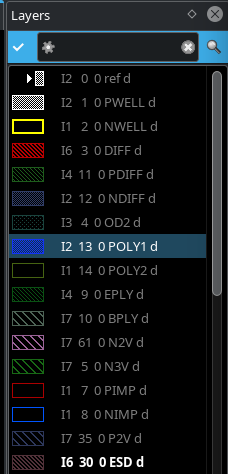
I thought I can find something inside 'current_view()'
pya.Application.instance().main_window().current_view()
it seems I cannot find anything useful at this level
I tried to examine the content of
pya.Application.instance().main_window().current_view().begin_layers()
(with this simple script, that print some property of the layer, like : valid,.visible ...)
print("\n\nbegin_layers")
ap=pya.Application.instance().main_window().current_view().begin_layers()
while not ap.at_end() :
cur=ap.current()
print(cur)
print(cur.name,cur.valid,cur.visible)
ap.next()
Still nothing is telling what is the current active layer in the gui (may is there but I do not know how to access)
I also trying a "promising" LayerInfo(), pya.LayerInfo(), apparently intuition does not help.
I am on the wrong track...
Comments
Why not trying the obvious? It's called "LayoutView#current_layer" ...
Matthias
I tried the obvious but I found not to be so obvious in python .... due to the switch between iterators and method.
The first issue was to answer the question: can this be done ?
I could not get it working in python, some doubts start emerging.
So, I had to learn basic ruby (methods inspection, sorting, etc )
In ruby it was more obvious. Actually, the syntax was more coherent than python
At this point I knew it was possible ...
Python:
1. import pya
2. layout_view=pya.Application.instance().main_window().current_view()
3. the obvious was
4. layout_view.current_layer().current().name
5. Nope ! tried various combination with/without () nothing work.
6.
7. layout_view.current_layer() => TypeError: 'LayerPropertiesIterator' object is not callable
8. layout_view.current_layer => ok
9. layout_view.current_layer.current.name => AttributeError: 'builtin_function_or_method'
10. layout_view.current_layer.current() => ok
11. layout_view.current_layer.current().name => finally I got 'I2 13 0 POLY1 d'
At the end 3 lines of code:
I got stuck on 4 and all variants because I was expecting "current_layer" to be a
method returning a list or something similar.
In spite
is telling me otherwise, the error also is saying 'LayerPropertiesIterator'
A classic example of seeing what you want, not what it is ...
Eventually I figure out.
I am used to cadence skill language, I have hard time to think in term of classes and iterator,
in skill almost everything is a list ...
Thanks anyway.
AI also failed
https://claude.ai
query:
by using https://www.klayout.de/doc-qt5/programming/index.html can you find how to write a script in python that identify what layer is selected in the gui ?
This is the code generated. It does not work !
It is partially correct.
Man, how I hate substituting for AI ...
If you read the documentation of "LayoutView#current_layer" here: https://www.klayout.de/doc-qt5/code/class_LayoutView.html#method70 - it gives you a valuable hint:
That means, it's a property, not a method. No brackets needed.
And if you fix the broken indentation of your code like this:
it works.
Sorry but I never heard about getter/setter. I end up reading this after your comment.
https://realpython.com/python-getter-setter/#what-are-getter-and-setter-methods
I am an analog designer, getter/setter, properties and decorations, not my bread and butter
tools ...