Howdy, Stranger!
It looks like you're new here. If you want to get involved, click one of these buttons!
Quick Links
KLayout DRC on large layouts

Hello! I have a question regarding DRC.
When running DRC on large & complex layouts, I often run into an issue of hanging/crashing. This seems to be particularly present when there are many instances of waveguide structures and rules such as separation, space, or width are attempting to be checked.
My local machine has 65GB ram & an 8 core processor.
I have these DRC commands (where layer and o_l are defined as layer inputs, value is a number, and rule & description are strings):
o_l.sep(layer, value).output(rule, description)
layer.width(value, angle_limit(45.degree)).output(rule, description)
layer.space(value) .output(rule, description)
And the behavior is that it slows my computer down, consuming all the memory, until KLayout becomes unresponsive for quite a while until eventually crashing. This behavior is also present when I implement tiling.
I am wondering what you suggest doing to be able to successfully run these kinds of DRC rules on layouts such as this with many structures present.
Thanks!
Comments
Hi spark_aeon,
To find out what's going on in a DRC script you can use the
profileDRC function. That will provide you with the time spent and memory used for each function call.verbose(true)is also useful in general debugging.It seems you are running out of memory. The
forgetmethod of the layer object could help.Regards,
S
Hi @spark_aeon,
There are too many reasons, so I am not able to give advice without a test case and the full DRC script.
As @srooks10 mentioned, "profile" can help you identifying the resource hogs.
Some hints:
I hardly see the need for using so much memory. Even millions of polygon vertexes should not be an issue, provided the problem is broken down properly.
Matthias
Thank you so much @srooks10 , that was very helpful information!
This set me on a path of updating the tiling behavior. I realized it would run a bit faster to forget and re-instantiate a layer for some rules that were running quite slowly.
When I have two layers in one particularly large layout with many grating coupler elements and I run this one rule (with tiling enabled):
o_l.sep(layer, value).output(rule, description)The behavior is that first, KLayout freezes, then eventually my entire computer freezes and becomes unusable until a forced shutoff and restart. I can monitor the memory usage and implement forget between rules when it makes sense between rules, but I'm wondering what resources exist within the engine to prevent this freezing behavior when just one rule is being processed. Updating the behavior to be more like this:
o_l = input(x,y)
layer = input(x,y)
o_l.sep(layer, value).output(rule, description)
o_l.forget
layer.forget
Did seem to help a little bit.
Thank you @Matthias !! Sorry for the delay in responding, there have been a few things going on with our layout and DRC work. I am not able to share my code and layout exactly as they are so I have done my best to sanitize and condense the question I currently have.
When I have a grating coupler element and a surrounding layer, I need to check that the waveguides of the grating coupler is within a certain distance from the edge of the surrounding layer.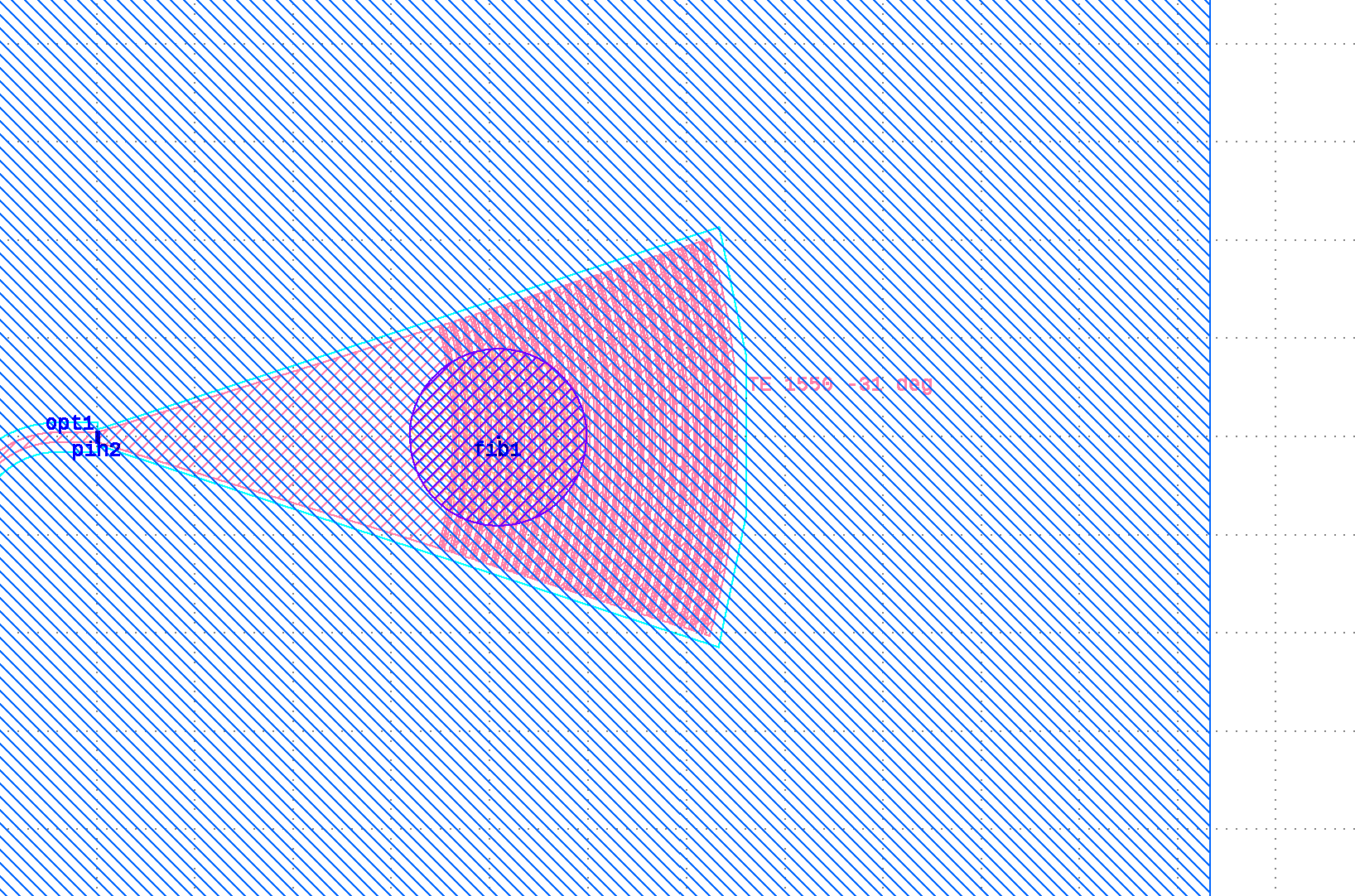
Here is a condensed version of the code I am trying to run for DRC of this check, with two options. Tiling is not displayed here, but we have hanging and freezing either way with the full layout and code.
The separation check has a very long delay, so I figured, why not try to check the distance ONLY on the portion of the surrounding layer that actually matters. However, the rect.sized command also hangs and freezes on the full layout and code. Can I get your advice on how to achieve the logic of this DRC check in a more optimal way? I am sure there is something I am not doing correctly.
Hi @spark_aeon,
I am sorry, but without insight into the layout, I really can't give proper advice. The deal is that free software benefits from public feedback and that includes public test cases.
A rough starting point for your research is why the "sized" operation takes so long. If the border is basically just a few rectangles, the sizing operation should be super fast. Maybe it is possible to provide the 588 layer alone as a test case. If the problem reproduces for the sized operation, I can't imagine someone would object to sending that boundary layer only and that gives me a clue what's going on, at least for the sized part.
Matthias
@Matthias Apologies for not properly including the file before! Let me know if this works, I really appreciate your time spent working with me on this.
Thanks for the test case. I will take a look!
Matthias
First of all, the sized method in "rect.sized" is fast as expected. "WG0.and(inner_border)" takes about 3.7s on my machine which is kind of expected as we're talking about estimated 2.5M vertexes involved here.
You can bring that time down to virtually nothing by switching to "deep" mode. The effect in your case is not utilization of hierarchy but a side effect of deep mode: to get a better approximation of a cell's footprint, in deep mode polygons are broken down to smaller and less complex pieces for which the bounding box is a better approximation and utilizes a two-level scanner approach. That is not necessarily a good idea in general for all-angle geometries, but in you case however, it gives a huge boost of performance for the booleans. It's always worth a try.
It does not give you a benefit for the separation step however.
I wonder somewhat if separation is really what you want to do. Separation is an external distance, so if you check WG0 against the envelope, you will never get an error. So that step is basically wasted. If the intention is to check if there is nothing outside the border, you could use a boolean:
If your intention is to check if anything outside keeps a distance of 10µm to the border (is that really a border then?), you can use a boolean with a (fast) sizing:
NOTE: You can speed up things somewhat if you need WG_0 inside and outside C_E together by using "andnot":
If you really need the separation step, continue reading here:
The separation method is slow, because DRC checks are based on interactions between objects (polygons or edges, depending on the type of inputs), including neighbor objects. "Neighbor" objects are objects from one of the inputs whose bounding box intersects with the enlarged bounding box of an object of the primary input. The enlargement value is given by the characteristic distance of the function - in case of the separation function that is the check distance.
Conceptually, the separation function
does that:
You see where this goes: as the distance is quite large and the polygons are not simple, the iteration runs over about 10000 polygons, collects maybe 20 other polygons and has to analyze about 5k vertexes on each iteration. That is some computation effort.
Changing the order makes things even worse:
In that case the is only a single iteration, but it will collect about 2.5M vertexes and has to analyze them. This basically makes DRC stall.
And that all does not make much sense, because there is not a single polygon outside C_E ...
If you really have WG0 outside C_E and you really want to use separation, you can help DRC a little, by running the separation check only against outside WG0:
I tried this on your case where I copied the gratings and placed them right of the C_E boundary (BTW: moving the instances was really slow. Need to investigate). The separation check ran in 25s and because I did not put enough space between the WG0 and C_E boundary, I got like 200k errors. When I increase the distance to more than 10µm I don't get errors and the separation check is very fast.
In your original test case of course the separation check of WG0_outside against C_E is a NOP and executes in no time.
Bottom line:
Matthias