Howdy, Stranger!
It looks like you're new here. If you want to get involved, click one of these buttons!
Quick Links
How to add custom libraries

I want to add a custom library to Klayout.
I tried to follow the article: https://www.klayout.de/doc-qt5/about/about_libraries.html
In this article the desired library is a GDS file, which is pasted in the library subfolder
But I dont see any subfolder named libraries.
My directory is as such: C:\Users\zakaria.37\AppData\Roaming\KLayout
There are folders and files there which I have attached a photo of.
Could anyone please help me with this? I am very new to Klayout

Comments
The image you attached is the KLayout installation directory.
Since you are running KLayout on Windows, you need to create the library directory:
C:\Users\zakaria.37\KLayout\libraries.Then, place a library file (*.gds) there.
For example, let's place

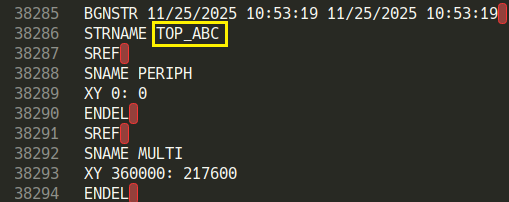
ABC.gds, where the LIBNAME isABC.DBand the top cell name isTOP_ABC.When you create a new layout, you will see the library, as shown below.

@sekigawa Thanks a lot for the explanation!
There is an important point about the LIBNAME: when you save a GDS file you can specify the library name - this is the one that appears in the "Libraries" tree. In the example above that is "LIB.DB".
In order to set it, use "Save As", and specify the library name in the "Library name" field:
I'd recommend version 0.30.5 as the previous versions had the habit to reset the library name occasionally.
Matthias