Howdy, Stranger!
It looks like you're new here. If you want to get involved, click one of these buttons!
Quick Links
Using an exclusion layer in DRC

Dear support,
I'm using KLayout (version 0.30.1 on Linux) for the DRC.
In photonics, some layers can have complex structures (many curves), and running a DRC on these structures can take many hours (>24 hours), and it is not uncommon that KLayout crashes in the end (because out of memory (>96 GB)).
Therefor, we want to exclude certain areas in a layer from the DRC.
(Even for simple structures, this is necessary because for finding overlaps of polygons within a single layer, it is sometimes allowed to have overlaps at specific locations. In photonics, 2 waveguides in the same layer may sometimes cross each other. So, we want to exclude these areas also from the DRC.)
So, I create a new layer, and place some polygons (the exclusion areas) in it. And I do the DRC check on
layer.not(exclusion_layer)
But this doesn't work, because after the boolean NOT operation, the layer is in 'clean' state, and this causes problems finding the overlaps.
Let me explain this with an example.
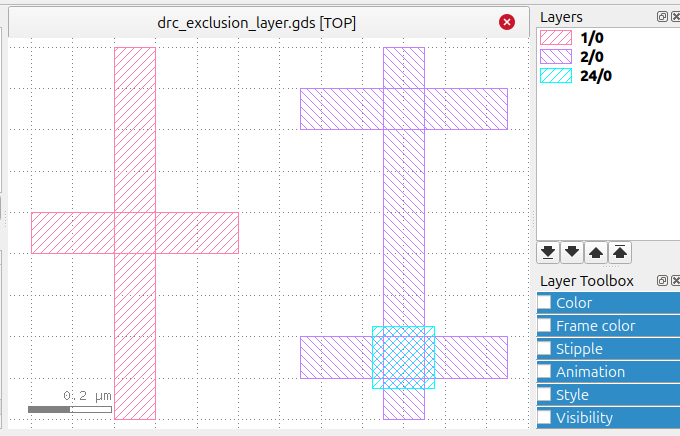
The left red cross in the layout are 2 straights (a horizontal and a vertical) in the same layer (layer 1).
I find the overlap with:
layer1 = input(1)
layer1.merged(2).output("Overlap layer1")
This gives the expected overlap.
The right purple 'double' cross in the layout are 2 horizontal straights, and these straights overlap with a vertical straight. These 3 straights are in layer 2. When I run the same check again (without using an exclusion layer), I get 2 overlaps (as expected) Call this the 'top-overlap' and the 'bottom-overlap'.
layer2 = input(2)
layer2.merged(2).output("Overlap layer2")
Now add the exclusion layer (layer 24, green).
exclusion_layer = input(24)
When I run the last overlap test again, I want to find the 'top-overlap', but not the 'bottom-overlap', because the exclusion layer has created a 'hole' at that spot.
layerEx = layer2.not(exclusion_layer)
layerEx.merged(2).output("Overlap layer2 with exclusion layer")
But this doesn't work. The 'bottom-overlap' is gone (good!), but the 'top-overlap' is also gone (bad!).
I discovered that the boolean NOT operation creates a layer in the CLEAN state (the merging has already been
done by the NOT operation). (Calling merged(2) on an already merged layer is pointless.)
layer2.not(exclusion_layer).is_merged? returns true.
I tried the following, but that didn't work:
layerExRawRaw = input(2).raw.not(input(24).raw)
layerExRawRaw.merged(2).output("Overlap layer2 (RawRaw) with exclusion layer")
How do I use an exclusion layer that only creates 'holes' in another layer, while leaving the rest of that layer unchanged (the layer remains in raw-state)?
(We also need this exclusion layer for other checks than the overlap check.)
Thanks, Remco
Remark: I also have the GDS file and the DRC file, but this forum blocks uploading these files. The "Attach file" only allows uploading images, which is the same as the "Attach image" button. Looks like a bug?
Comments
Many kits use blocking and identifying purpose
layers to steer DRC and extraction.
There needs to be the logical use of those
polygons of course. Every "real" layer of
interest would be "ANDNOT"ed with its
exclusion layer to make a meta-layer that
gets checked instead, rule by rule. Complex
or "fussy" technologies can have a lot of
that.
Examples of such things, that work in klayout
are worth collecting.
I've in the distant past done things using a
combo of layer and "getTexted()" (Brand X,
back in the Diva days) to make "super surgical"
blockages that somebody can't defeat by just
placing a polygon - tag with the rule# and
you can get really fine grained.
Hi @remco,
you can upload files by packing them into a .zip archive.
But 96GB memory is insane. Something is badly wrong here. I can hardly image a photonics mask that really takes such much memory to process in DRC.
There are some pitfalls which may cause such trouble. For example, if you apply a huge sizing to curved features or if you check for a very long distance or width in these cases, intermediate layers may contain a plethora of markers. You can dump these layers or check the figure counts to identify the bad guys. Optimization strategies are sizing in multiple steps or constraining DRC checks. Do you have a chance to provide the layouts which cause that trouble?
Coming to the original question: detecting overlaps in DRC from original layers is quite unusual. GDS (and other formats) have a policy of "non-zero wrap count". That is: a photo mask is dark or bright (depending on the contrast), when you draw on a layer at least once. Drawing twice does not change the mask. In other words: you can arbitrarily overlap polygons and can still get the same mask. This is heavily utilized in construction of hierarchical layouts. A macro or device typically has "pins" and you attach to them by drawing a wire or well layer in any overlapping way.
The booleans deliver output under the same policy, so they are free to merge polygons or to remove overlaps. "raw" state is not something that is preserved, it is a special condition which is helpful in a few, special cases.
This implies that "merged(2)" is hardly used on input layers. The overlap case you describe is a perfectly valid wire crossing in usual layouts, not the interaction of two objects.
The exclusion layer would work as expected, if you subtract it after detecting the overlaps, but I understand this is not what you try to achieve. You can achieve your desired result using the universal DRC function, which essentially allows computing local expressions without the intermediate merge step:
But I still think your problem has an entirely different root cause and a little bit of optimization can fix it.
Matthias
Hi @Matthias,
Thanks for your answer. Because it is not possible to use an exclusion layer in Klayout the way we want to use it, we found another solution (but it is not perfect). The idea is as follow:
We create 2 extra layers, and the designer should create all his shapes (polygons) in the first one. And all the defined DRC checks should run on this layer. Shapes/polygons which should be excluded from DRC should be created in the second layer, and we will not run DRC on this layer. The final layer, layer(2/0), is a boolean OR (the 'sum') of these two layers.
(We wanted to use this exclusion layer also for other checks than an overlap test.)
The GDS files we use are from customers, and we are not allowed to share these files. I will ask them if they have other files with problems, which I can share. I will create a new issue for that, if I have some test files.
Thanks again.
Remco
Hi Remco,
I understand that you can't share the test case. That is quite common. Unfortunately I cannot give much advice without seeing the actual problem.
A general debugging strategy is first to identify the step that causes the issue. You can turn on verbose mode in the DRC deck and KLayout will print the commands executed with the run times and process memory.
Usually, there is one operation that spoils the whole thing. In most cases there is a simple explanation for the behavior. If you have an operation that takes for example polygons with a complexity of 10k points in total and the operation takes two hours and consumes 16G of memory, something is going wrong. Any well-mannered operation should not take more than maybe 200 Bytes per point - in your case ~2MB. Maybe it's a little more, but 16G is far off.
A reason for such a behavior is often long distance interactions.
If for example, you check a dense layout against a very long distance (or, correspondingly, a thin, but complex polygon checked against a much bigger width), your will force the algorithm to investigate a plethora of edge-to-edge interactions, leading to a O(2) complexity explosion in the extreme case. Some operations record the interactions and that will allocate a lot of memory.
There are strategies to avoid such cases, but it's hard to point to a solution without precise knowledge of the situation. Maybe this explanation helps you to identify the problem and break it down to a test case you can share.
Regarding your solution: did you try the proposal using the universal DRC approach above ("drc" function)?
Matthias